Environment
This demo is hosted on dCloud, but it is considered Community Developed and therefore is not subject to standard dCloud validation or support.
The environment utilizes a simulation engine, which allows for showcasing a broader set of capabilities in a consistent and scalable manner. Please follow these recommendations so that you are not caught off-guard when using the demo in public.
-
Use Google Chrome (or a browser using the standard Chromium engine) in incognito/private mode to avoid simulation errors or unexpected behaviors when navigating the demo.
-
Consider this as a prescriptive demo with a limited set of screen simulations. Not all screens are simulated, so please only perform tasks that are in this guide or practice before using the demo.
Objectives
Upon completing this lab, you will gain familiarity with the following technologies at a high level and understand the value of each product feature or function:
-
The new and improved Intent-Based workflows in Cisco Catalyst SD-WAN Manager, commonly referred to as UX 2.0.
-
The updated NGFW & Embedded Security capabilities, powered by direct integration with Cisco Identity Services Engine to enable SGT-aware use cases.
-
Integration with Security Services Edge (SSE) providers, to create a SASE solution.
-
Network Wide Path Insights (NWPI) and its ThousandEyes integration.
-
- NEW - Onboarding of SD-WAN-Enabled IIoT Devices using Configuration Catalog and cellular connectivity monitoring.
-
SD-Routing and cloud connectivity using Cloud OnRamp for Multicloud.
Each of these use cases can be run separately and in any particular order according to your interest. There is no direct dependency between them.
Topology
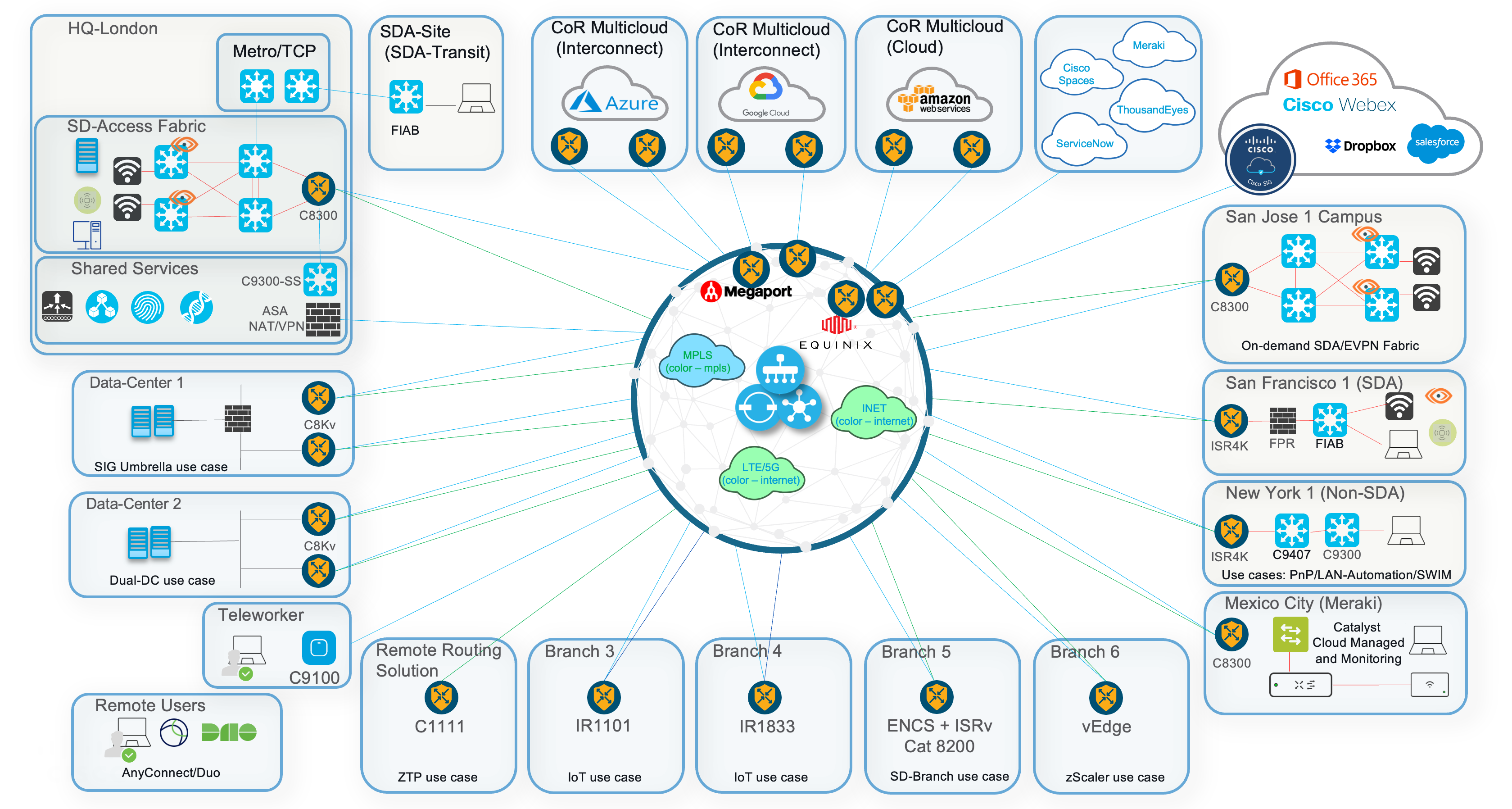
Please click on this link to download the topology file in PDF format for optimal viewing. Kindly note that once downloaded, it is considered an uncontrolled copy. It is recommended to always refer to this lab guide for the most up-to-date topology version.
Connecting
The SD-WAN Manager (previously known as vManage) GUI is accessible directly from the dCloud catalog.
Please open your connection to it from your local machine's browser.
Credentials
The Catalyst SD-WAN Manager will automatically log in. If it prompts for credentials, please use the following:
- Username:
demo - Password:
demo1234!